Securing your CaaS using Google's gVisor

TL;DR — A standard Linux container is an isolation boundary, not a security boundary. Every container on a host shares one kernel, so a single kernel exploit can compromise the whole node. gVisor inserts a user-space kernel (
runsc) between your container and the host, dramatically shrinking the attack surface. It’s now production-grade — Google runs Cloud Run, App Engine and Cloud Functions on it — and integrates cleanly withcontainerdand Kubernetes viaRuntimeClass.
For the uninitiated
Linux container technology has existed since the early 2000s in the form of LXC , but Docker was responsible for popularising containers with an easy interface for building and managing every part of a containerised application’s lifecycle. Similar technologies have existed in other operating systems for even longer — FreeBSD jails, AIX Workload Partitions and Solaris Containers/Zones.
In 2015, CoreOS introduced rkt — a new App Container Image format intended to rival Docker’s specification. To prevent the container ecosystem from fragmenting, the Open Container Initiative (OCI)
, formerly the Open Container Project, was established. OCI is hosted by the Linux Foundation and standardises container image and runtime formats. (For the curious: rkt was archived by the CNCF in 2020, and CoreOS was acquired by Red Hat in 2018 — Docker, containerd and OCI carried the day.)
In this article I’ll talk about Docker and securing container platforms generally, but the same techniques apply to any container system that builds on containerd .
Why containers?
One of the biggest challenges in modern software development is the eternal “it works on my machine ¯\(ツ)/¯” — reliable parity between dev, test and production environments. Modern DevOps tools and practices solve this to a great extent, but not every organisation has the same DevOps maturity. Producing immutable infrastructure for a polyglot runtime environment is time-consuming and expensive to maintain.
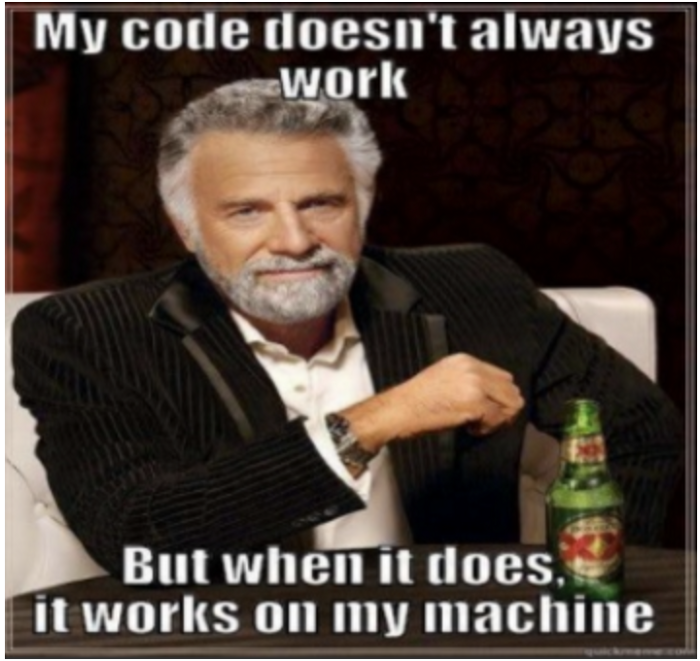
The eternal problem containers were built to solve.
Docker containers solve this by bundling the entire runtime environment — the application, language runtime, dependencies, supporting binaries and configuration files — into a single artefact called a Docker image. The only thing not bundled is the kernel; the host kernel is shared across every container.
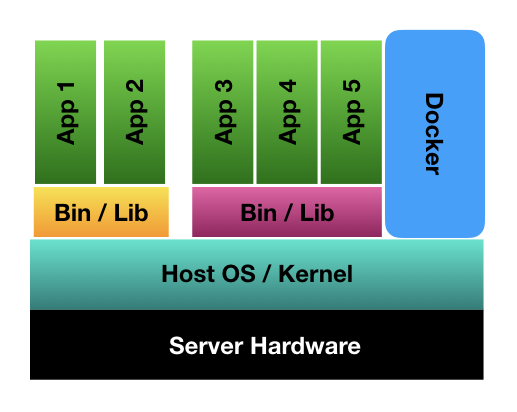
Containers share the host kernel — that’s both their efficiency and their risk.
It’s quite common to see many containers running on the same host. A node managed by Kubernetes can run up to 110 pods per node by default. This works because Linux namespaces provide isolation (process, network, mount, UTS, etc.) and cgroups allocate and cap CPU, memory and I/O.
What containers are not
Containers provide isolated runtime environments for your application. Isolation is not the same as security or sandboxing. Without the right controls, a compromised container can enable privilege escalation that breaks out to the host and compromises every other workload running on it.
A well-known example from the recent past is the Dirty COW
vulnerability — a copy-on-write race in the Linux kernel that let an unprivileged process gain write access to read-only memory mappings, including those owned by root. More recent container-specific examples include the runc /proc/self/exe escape (CVE-2019-5736)
and the Leaky Vessels family (CVE-2024-21626 and friends)
, both of which let a hostile container break out to the host.
These vulnerabilities are exploitable because the guest container has direct access to host kernel syscalls. Seccomp and AppArmor can mitigate the risk, but configuring them well demands real expertise and ongoing maintenance.
Are you scared yet?
You should be — if you are:
- A hosting provider. You don’t necessarily trust the code running on your infrastructure (think Heroku, Fly.io, Cloud Run). Customers may have malicious intent and could be running exploits against your platform.
- A cluster admin. You may know your customers, but if you work in a large enterprise with a mature CI/CD pipeline, code probably ships to production several times a day. You can’t realistically inspect every change for vulnerable code. Plenty of tools help, but none guarantee perfect coverage.
- Required to run a vulnerable application. It sounds unlikely, but I’ve seen organisations run media libraries and OCR software with known buffer-overflow vulnerabilities that were never patched, kept in production for lack of an alternative.
- Affected by a zero-day vulnerability. Vendors take time to release security patches. During that window you are largely a sitting duck.
gVisor to the rescue
gVisor aims to provide a sandboxed environment for containers.
gVisor is a user-space kernel, written in Go, that implements a substantial portion of the Linux system surface. It includes an Open Container Initiative (OCI) runtime called
runscthat provides an isolation boundary between the application and the host kernel. Therunscruntime integrates with Docker and Kubernetes, making it simple to run sandboxed containers.
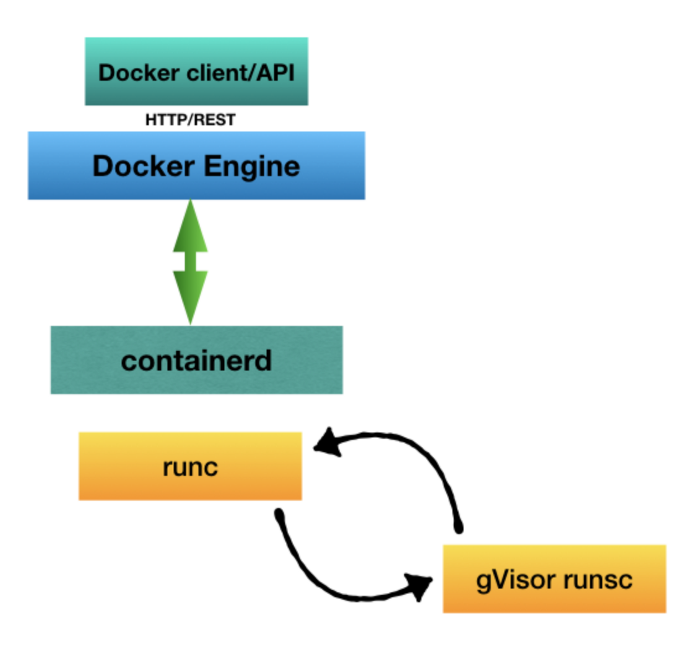
With gVisor, syscalls hit a user-space kernel before they ever reach the host.
Because gVisor is OCI-compliant, it’s a drop-in replacement for runc. The runtime is split into two cooperating processes: Sentry and Gofer. Sentry is the user-space kernel — it intercepts syscalls made by the container and services them itself, never forwarding them straight to the host. Gofer is a 9P file proxy that mediates filesystem access between the sandbox and the host.
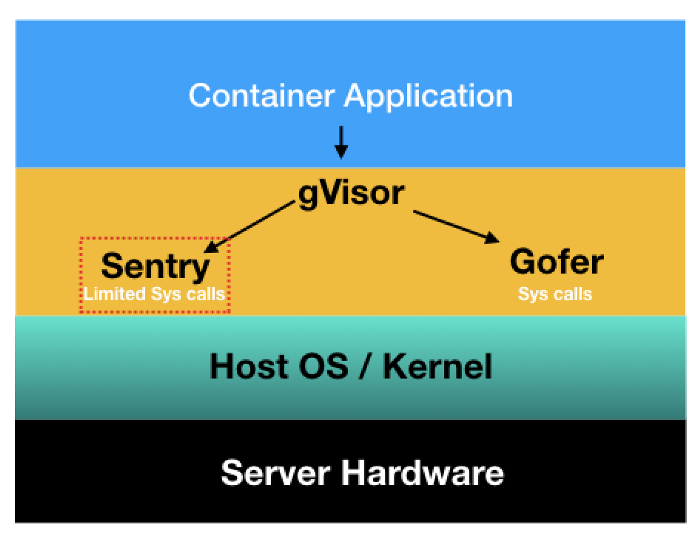
Sentry handles syscalls; Gofer brokers filesystem access — both run as unprivileged user-space processes.
What’s the catch?
When this post was first written in 2018, gVisor was new and supported a limited set of workloads. As of 2026 it’s production-grade — Google runs Cloud Run, App Engine and Cloud Functions on top of it — and the syscall coverage has expanded significantly beyond the original ~200 syscalls. Most server-class workloads (Go, Java, Node, Python, PHP, Postgres, MySQL, MariaDB, MongoDB, Redis, Memcached, Nginx, httpd, Tomcat, Jenkins, Prometheus, the Docker registry, WordPress) run unmodified.
That said, gVisor is not a free lunch:
- Syscall coverage is still a subset of Linux. Workloads that lean on exotic ioctls, raw networking, or kernel features gVisor doesn’t implement may break or fall back to slower paths.
- Performance trade-offs are real. I/O-heavy and syscall-heavy workloads (databases pushing hard, build systems, JIT-heavy runtimes) can see measurable overhead. The official gVisor performance guide publishes current benchmarks — refer to those rather than guessing.
- Some kernel features are unavailable. Things like specific cgroup v2 controllers, certain BPF features, and direct GPU access need extra plumbing or may not work at all.
How to actually use it
Once runsc is installed on the node, wiring it into containerd and Kubernetes is straightforward.
containerd
Add a runtime entry to /etc/containerd/config.toml:
[plugins."io.containerd.grpc.v1.cri".containerd.runtimes.runsc]
  runtime_type = "io.containerd.runsc.v1"
Then restart containerd: sudo systemctl restart containerd.
Kubernetes RuntimeClass
Define a RuntimeClass once per cluster:
apiVersion: node.k8s.io/v1
kind: RuntimeClass
metadata:
  name: gvisor
handler: runsc
Then opt individual pods into the sandbox:
apiVersion: v1
kind: Pod
metadata:
  name: untrusted-workload
spec:
  runtimeClassName: gvisor
  containers:
  - name: app
    image: ghcr.io/example/untrusted:latest
A common pattern is to use a node label or taint so only nodes with runsc installed receive sandboxed pods, then default untrusted namespaces to runtimeClassName: gvisor via a mutating admission policy.
Alternatives worth knowing about
gVisor isn’t the only sandbox in town. Worth comparing before you commit:
- Kata Containers — runs each container (or pod) inside a lightweight VM. Stronger isolation than gVisor at the cost of startup time and memory overhead.
- Firecracker — AWS’s microVM. Powers Lambda and Fargate. Very fast boot, very strong isolation, but you typically consume it through a higher-level platform rather than directly.
- Sysbox
— a runtime focused on running system-like workloads (Docker-in-Docker, systemd) inside containers, with stronger isolation than
runc. - Confidential containers — AMD SEV-SNP and Intel TDX-backed sandboxes for cases where you need to defend against the host operator, not just neighbours.
In practice, gVisor is a sweet spot for multi-tenant container platforms that need stronger-than-runc isolation without a full hypervisor.
Key takeaways
- A container is not a security boundary on its own.
- Defence-in-depth: combine seccomp, AppArmor and a sandboxed runtime — don’t rely on any single layer.
- gVisor is production-grade in 2026 and is the easiest stronger-than-
runcoption to drop into existing containerd / Kubernetes setups. - For raw-throughput workloads, benchmark with the official perf guide before flipping the switch in production.
- If you need stronger isolation than gVisor, Kata Containers and Firecracker are the next steps up.